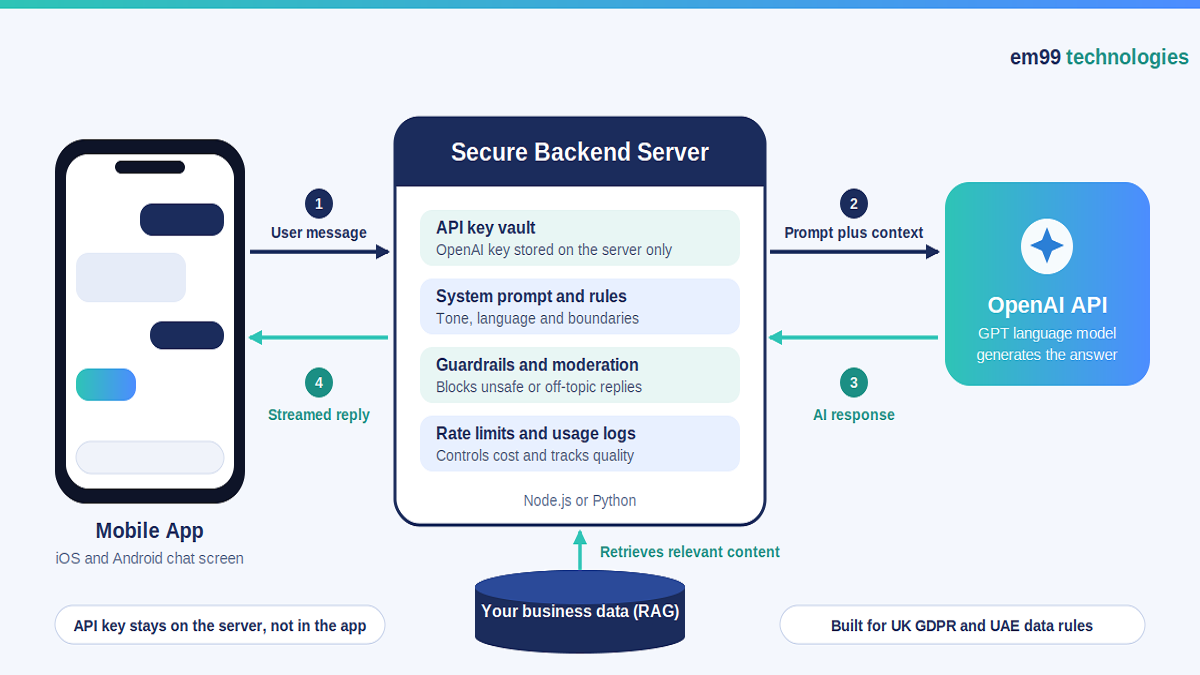
To add ChatGPT to a mobile app, connect your app to the OpenAI API through a secure backend server. The app sends the user’s message to your server, the server calls the API with your instructions and business data, and the reply is streamed back into the chat screen. This keeps your API key safe and your costs under control.
ChatGPT reached an estimated 100 million monthly users within two months of launch, according to a UBS study reported by Reuters, making it one of the fastest growing consumer products ever. People are already comfortable talking to AI. Your customers in London, Manchester, Dubai and Abu Dhabi will soon expect the same from your app.
This guide explains how to add ChatGPT to a mobile app in plain English. You will learn the architecture, the steps, the typical costs, the compliance points for the UK and UAE, and the mistakes that slow teams down. If you would rather have specialists handle it, our mobile app development team at em99 Technologies builds AI features like these for clients across the UK, UAE and KSA.
Why Add ChatGPT to a Mobile App Right Now
A conversational layer is not a gimmick when it solves a real problem. Most businesses we speak to share the same pain points. Support queues are growing, in-app search returns nothing useful, new users drop off during onboarding, and teams spend hours writing repetitive replies. A well-built AI assistant tackles all four.
- Faster support. Answer common questions instantly, around the clock, and pass complex cases to a human agent.
- Smarter search. Let users describe what they want instead of guessing filters and keywords.
- Higher engagement. Personalised suggestions, summaries and guided onboarding keep people inside your app for longer.
- Lower running costs. Automate drafting, ticket sorting and document summaries that currently eat staff time.
- A real competitive edge. In crowded UK and UAE markets, an assistant that genuinely helps becomes a reason to choose you over a rival.
Government backing helps too. The UK published its AI Opportunities Action Plan in January 2025, and the UAE has pursued its National Strategy for Artificial Intelligence 2031 for years. Both markets are friendly ground for AI powered products.
What Does It Mean to Add ChatGPT to a Mobile App
You do not paste the ChatGPT website into your app. Instead, you connect your app to the OpenAI API, which gives you access to the same family of large language models behind ChatGPT. Your app sends the user message plus your instructions, the model returns a reply, and your app displays it inside your own branded interface.
That distinction matters. With the API you control the tone, the rules, the data the assistant can see and the actions it can take. Some UK and UAE enterprises also consider Azure OpenAI Service when they want regional hosting options and tighter enterprise controls. The integration pattern is very similar either way.
How to Add ChatGPT to a Mobile App Step by Step
Here is the process we follow when we integrate ChatGPT into an app, from first idea to live release.
Step 1 Define the Use Case and Success Metric
Start with one job the assistant must do well. Examples include answering order questions, recommending products, booking appointments or summarising reports. Then pick a number that proves it works, such as fewer support tickets, higher conversion or shorter onboarding time. Teams that skip this step usually end up with a chatbot nobody uses.
Step 2 Choose the Right Architecture
Never place your OpenAI API key inside the mobile app. Anyone can extract it and run up your bill. The safe pattern is a thin backend layer. The app talks to your secure server, your server talks to the OpenAI API, and the answer flows back to the app.
This backend proxy lets you hide keys, apply rate limits, log usage, filter unsafe content, and switch models later without forcing every user to update the app.
Step 3 Set Up the OpenAI API and Your Backend
Create an OpenAI platform account, generate an API key and store it in a secret’s manager. Build a chat endpoint on your backend using Node.js or Python. Write a clear system prompt that defines the assistant role, tone, language and boundaries. Set sensible limits for response length, timeouts and retries.
Turn on streaming so the reply appears word by word. It makes the app feel fast even when the full answer takes a few seconds to generate.
Step 4 Design a Chat Experience People Trust
Great AI still fails inside a clumsy interface. Strong UI and UX design makes the difference between a feature people try once and one they use daily. Include a typing indicator, suggested prompts, a clear label showing users they are talking to AI, thumbs up and down feedback, and a simple route to a human agent. For UAE audiences, plan right to left layouts and Arabic support from day one.
Step 5 Connect Your Own Business Data
A generic model does not know your products, prices or policies. The fix is retrieval augmented generation, often shortened to RAG. Your content is stored in a searchable index, the most relevant passages are fetched for each question, and the model answers using only that material. This sharply reduces made up answers.
You can go further with function calling, which lets the assistant check an order, book a slot or update a profile. Our AI and ML solutions engineers use the OpenAI platform for exactly these chatbot, search and recommendation features.
Step 6 Test, Secure and Launch Carefully
Build a test set of real questions and score the answers for accuracy. Try to break the assistant with off-topic and adversarial prompts. Measure response time and the average cost per conversation. Release to a small percentage of users behind a feature flag, watch the numbers, then roll out wider.
Remember to update your App Store privacy details and Google Play data safety section, since user messages may be processed by a third party.
Best Tech Stack for ChatGPT Integration on iOS and Android
The right stack depends on your product and team. Native Swift and Kotlin give maximum platform polish. Cross platform tools such as React Native and Flutter let you ship one codebase to both stores, which usually cuts cost and time. For the backend, Node.js and Python are the most common choices, paired with PostgreSQL or a vector database for your knowledge base.
Whichever route you take, keep the AI logic on the server. That keeps your app lightweight and lets you improve prompts and models without a new store release.
Security, Privacy and Compliance for UK and UAE Apps
Trust decides whether users share their data with an AI assistant. In the UK, UK GDPR and the Data Protection Act 2018 apply, and the ICO publishes guidance on AI and data protection. In the UAE, the Federal Decree-Law No. 45 of 2021 on personal data protection applies, and free zones such as DIFC and ADGM have their own data regimes. Health and government data can carry extra residency rules.
Use this checklist as a starting point.
- Keep API keys on the server and never inside the app bundle.
- Minimise data. Remove names, card numbers and health details from prompts wherever possible.
- Tell users clearly when they are talking to AI and how their data is used.
- Review your provider’s data retention and training terms for API data.
- Add moderation and guardrails to block harmful or off-topic responses.
- Store conversation logs securely with role-based access and retention limits.
- Run a data protection impact assessment where the law or your risk profile requires one.
This is general information and not legal advice, so confirm requirements with your legal or compliance advisor.
How Much Does It Cost to Add ChatGPT to a Mobile App?
Costs fall into two parts. The first is the one-off build, which covers design, backend, integration and testing. The second is running cost, mainly API usage billed by tokens plus hosting. Simple assistants cost very little per conversation, but usage scales with your user base, so monitoring matters.
The table below shows indicative ranges for UK and UAE projects. Your final quote depends on scope, integrations and compliance needs.
| Project scope | What is included | Typical timeline | Indicative build budget |
| Starter AI assistant | FAQ chatbot, branded chat screen, secure backend proxy, basic guardrails | 3 to 6 weeks | £8,000 to £20,000 (about AED 40,000 to 100,000) |
| Smart assistant | Knowledge base with RAG, user accounts, personalisation, analytics, human handoff | 6 to 12 weeks | £20,000 to £50,000 (about AED 100,000 to 245,000) |
| Advanced AI product | Function calling, Arabic and English support, enterprise security, system integrations | 3 to 6 months | £50,000 and above (about AED 245,000 and above) |
To keep spending under control, set monthly budgets, cache repeated answers, and use smaller models for simple tasks. If you are starting from scratch, launch the AI feature inside an MVP development project so you can validate demand before investing in a full platform.
Common Mistakes When You Integrate ChatGPT Into an App
Calling the API straight from the app. It exposes your key and removes your ability to control usage.
Launching without guardrails. An assistant that answers anything, including things it should not, damages your brand fast.
Ignoring Arabic and right to left design. In the UAE, weak Arabic support loses a large share of potential users.
Treating AI as a feature, not a product. Without metrics, feedback loops and regular prompt updates, quality drifts over time.
Underestimating running costs. Long conversations and large prompts add up. Plan usage limits early.
Real World Use Cases for UK and UAE Businesses
Fintech and Banking Apps
Assistants can explain transactions, guide customers through onboarding and answer product questions while keeping sensitive actions behind secure authentication. Strict logging and human review make compliance teams comfortable.
Healthcare and Wellness Platforms
Patient portals can use AI for appointment help, plain language explanations of clinic instructions and staff-facing summaries. The assistant should support clinicians, never replace clinical judgement, and privacy design must come first.
Retail, Real Estate and Hospitality
Shoppers can describe what they want and get tailored suggestions. Property buyers in Dubai or London can ask for homes by lifestyle rather than filters. Hotels and restaurants can handle bookings and guest questions in several languages. You can see how we approach real products in our case studies.
Why Choose em99 Technologies for ChatGPT Integration
Choosing a partner is the biggest decision in this project. em99 Technologies has been engineering software since 2013 and is rated 4.9 on Clutch by more than 120 verified clients. We combine AI accelerated delivery with careful engineering, so you get speed without cutting corners.
- Mobile expertise in React Native, Flutter, Swift and Kotlin.
- Hands-on experience with the OpenAI platform for chatbots, search and recommendations.
- Transparent two-week sprints with weekly demo builds and a stated 98 percent on-time sprint delivery rate.
- NDA on request, and you own the bespoke source code once contractual obligations are met.
- Teams that cover UK, UAE, KSA and US time zones, with 24/7 managed support after launch.
Frequently Asked Questions
Can I add ChatGPT to an existing mobile app?
Yes. In most cases we add a backend layer and a new chat module without rebuilding your app. The effort depends on your current architecture and how deeply the assistant needs to connect to your data.
How long does it take to integrate ChatGPT into an app?
A focused assistant can be live in a few weeks. A smart assistant with your own knowledge base usually takes six to twelve weeks, including testing.
Is it safe and compliant to use ChatGPT in my app?
It can be, when you design for it. Keep keys on the server, minimise personal data, disclose AI use, and follow UK GDPR or UAE data protection rules for your sector.
Does ChatGPT work well in Arabic?
Modern GPT models handle Arabic well, but you should still test dialects, tone and right to left layouts with real users before launch.
Do I need to train my own AI model?
Almost never. Most apps get excellent results from a hosted model combined with good prompts and retrieval from your own content, which costs far less than training from scratch.
Final Thoughts on How to Add ChatGPT to a Mobile App
Learning how to add ChatGPT to a mobile app comes down to a few smart decisions. Pick one valuable use case, route every request through a secure backend, ground answers in your own data, design a trustworthy interface and respect UK and UAE privacy rules. Do that, and your app stops being a collection of screens and becomes a helpful assistant your customers return to.